














Docovly for AI Productivity
- Subscription
- 4
- V1.0.0
AI-Powered Document Restoration & Recovery
Docovly – AI-Powered Document Restoration & Recovery
Docovly is an AI-powered document restoration platform designed to restore faded, damaged, stained, and difficult-to-read documents while preserving the information and structure present in the original. It helps transform deteriorated documents into clearer, more readable digital copies for preservation, research, storage, and sharing.
Key Features
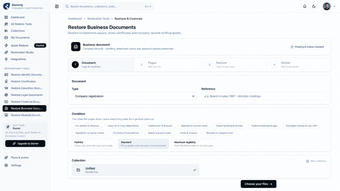
AI Document Restoration:Analyzes document damage and applies targeted restoration techniques to improve readability and visual quality.
Faded Text Recovery:Enhances faded, low-contrast, and difficult-to-read text while preserving the original character of the document.
Damage & Stain Removal:Reduces stains, foxing, water damage, discoloration, noise, and other visible deterioration.
Tear & Hole Repair:Repairs damaged page areas, tears, missing corners, and other physical defects where the surrounding structure provides enough information for restoration.
Crease & Fold Removal:Reduces distracting folds, creases, shadows, and page distortions.
Ink Bleed Removal:Reduces ink bleed-through and show-through from the reverse side of pages while preserving visible content.
Scan & Photo Enhancement:Improves documents affected by poor scans, uneven lighting, glare, blur, and image-capture problems.
Historical Document Restoration:Designed for old manuscripts, letters, certificates, books, records, photographs of documents, and other historical materials.
Handwriting Enhancement:Improves the visibility of faded handwritten content while retaining the original appearance of surviving writing.
Document Verification:Helps identify uncertain or potentially unreliable information. Docovly is designed to restore existing content rather than invent missing text.
Original Preservation:Restoration does not replace the original document, allowing users to preserve the source and compare restoration results.
How It Works
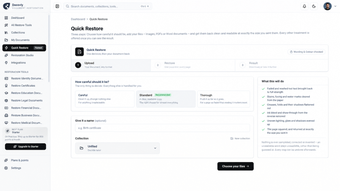
Upload:Upload a supported document, scan, or photograph through the web application.
Analyze & Restore:Docovly analyzes the document condition and applies appropriate restoration and enhancement techniques.
Verify:The restored result is checked for readability and potential uncertainty, helping distinguish recovered information from content that cannot be reliably restored.
Download:Receive a clearer restored version suitable for digital preservation, research, printing, storage, or sharing.
Use Cases
Docovly can be used for restoring birth and marriage certificates, educational records, legal documents, government records, military records, financial documents, medical records, historical manuscripts, family letters, archival materials, books, newspapers, and other damaged or deteriorated documents.
It is useful for individuals, genealogists, historians, researchers, archives, libraries, museums, universities, businesses, and organizations working with important historical or personal records.
Document Integrity
Docovly follows a restoration-first approach: recover what can be supported by the original document and avoid presenting unknown or missing information as fact. This helps users preserve the authenticity and integrity of important documents while making damaged content easier to read and work with.
Platform
Docovly is a web-based application accessible through modern browsers. AI processing is performed online, allowing users to restore documents without installing specialized desktop software.
Loading…


App specs
Developer
License
Subscription
Version
1.0.0
Latest update
Platform
Web Apps
OS
Internet Explorer
Language
Spanish
Available languages
- Spanish
- French
- German
- Portuguese
Program available in other languages
Docovly for AI Productivity
- Subscription
- 4
- V1.0.0
User reviews about Docovly
Have you tried Docovly? Be the first to leave your opinion!
Add reviewTop downloads AI Productivity for Web Apps
Top downloads AI Productivity for Web Apps
My Spicy Vanilla
Romance writing with a multimedia twist

Scribot
Scribot: AI-Powered Note-Taking Revolution

WhisperAI
AI transcription, summaries, translation, and API access in one Whisper transcription platform.
Stepseed
Stepseed: Your Personal AI Goal Tracker
Her Trip Planner
AI Trip Planning Tool for Women Travelers
Top downloads AI Productivity for Web Apps
Related topics about Docovly
Latest articles

Netflix and Sega announce Crazy Taxi, Sonic and Stranger Than Heaven adaptations

Zack Snyder’s The Last Photograph premieres at TIFF: early reviews are poor

Paramount ends Netflix animation deal: two movies are still coming

Nvidia and Palantir reportedly curb public AI use: data-leak fears grow

Warlock is now official: no Baldur’s Gate 3-style choices
Laws concerning the use of this software vary from country to country. We do not encourage or condone the use of this program if it is in violation of these laws. Softonic may receive a referral fee if you click or buy any of the products featured here.